> For the complete documentation index, see [llms.txt](https://apps.sanomads.com/slice-n-save/llms.txt). Markdown versions of documentation pages are available by appending `.md` to page URLs; this page is available as [Markdown](https://apps.sanomads.com/slice-n-save/use-cases/bogo-buy-x-get-y.md).

# BOGO - Buy X Get Y

How to create <mark style="color:yellow;">**bogo discount**</mark> for the products on your Shopify store using the <mark style="color:yellow;">**Buy X Get Y**</mark> option? A simple walkthrough.

{% embed url="<https://drive.google.com/file/d/17C8HVLJ9Rj2jMvQ_xak2MgTPegfGywEl/view?usp=drive_link>" %}

## Guide

1. Create a new [<mark style="color:yellow;">**Discount**</mark>](https://admin.shopify.com/apps/slice-n-save/discounts).

<figure><img src="https://4042363633-files.gitbook.io/~/files/v0/b/gitbook-x-prod.appspot.com/o/spaces%2FyCqyybRMHhSfaSIg5gmh%2Fuploads%2FswlhGxuJ8cH5tFuAnQOr%2FScreenshot%202024-11-07%20at%206.36.55%E2%80%AFPM.png?alt=media&amp;token=6d4b6ea4-2a8b-4e6f-8ecb-fb5739b831a9" alt=""><figcaption></figcaption></figure>

2. Select the <mark style="color:yellow;">**Buy X get Y**</mark>  option from the given list of discount types.

<figure><img src="https://4042363633-files.gitbook.io/~/files/v0/b/gitbook-x-prod.appspot.com/o/spaces%2FyCqyybRMHhSfaSIg5gmh%2Fuploads%2FcfCqELQzeAlKOYkYLXqK%2FScreenshot%202024-11-12%20at%201.49.10%E2%80%AFPM.png?alt=media&amp;token=df424a1d-7094-4214-b160-bf350f9106ea" alt=""><figcaption></figcaption></figure>

3. Select <mark style="color:yellow;">**method**</mark> and <mark style="color:yellow;">**title**</mark> for the discount.

<figure><img src="https://4042363633-files.gitbook.io/~/files/v0/b/gitbook-x-prod.appspot.com/o/spaces%2FyCqyybRMHhSfaSIg5gmh%2Fuploads%2FEiYq59g7jmP1OiYoRKN6%2FScreenshot%202024-11-12%20at%201.51.32%E2%80%AFPM.png?alt=media&amp;token=b11e8f11-7f69-41ed-aae5-a582a0c128f7" alt=""><figcaption></figcaption></figure>

4. Add multiple <mark style="color:yellow;">**conditions**</mark> to handle the validation of the bogo discount on the cart and checkout page.

<figure><img src="https://4042363633-files.gitbook.io/~/files/v0/b/gitbook-x-prod.appspot.com/o/spaces%2FyCqyybRMHhSfaSIg5gmh%2Fuploads%2FHMVkIE53cfJHRFz1ZUus%2FScreenshot%202024-11-12%20at%201.53.13%E2%80%AFPM.png?alt=media&amp;token=63a8bb66-6b9d-4761-b04a-97dad97e0acc" alt=""><figcaption></figcaption></figure>

5. Add multiple <mark style="color:yellow;">**criteria**</mark> to handle the validation of the discount at product level.

<figure><img src="https://4042363633-files.gitbook.io/~/files/v0/b/gitbook-x-prod.appspot.com/o/spaces%2FyCqyybRMHhSfaSIg5gmh%2Fuploads%2FhgiWnvfpxfRp67cXMf9h%2FScreenshot%202024-11-07%20at%206.50.26%E2%80%AFPM.png?alt=media&amp;token=47208603-14b4-4c1c-b4ab-8c552405d57c" alt=""><figcaption></figcaption></figure>

6. Select the <mark style="color:yellow;">**quantity**</mark> & <mark style="color:yellow;">**products**</mark> which customer is required to buy & get. Make sure all of these products are added in the cart.

<figure><img src="https://4042363633-files.gitbook.io/~/files/v0/b/gitbook-x-prod.appspot.com/o/spaces%2FyCqyybRMHhSfaSIg5gmh%2Fuploads%2FJEXt8hOz34oqOjAgzuWB%2FScreenshot%202024-11-12%20at%202.10.21%E2%80%AFPM.png?alt=media&amp;token=7962771a-4f63-4a4b-871c-26335d19f43e" alt=""><figcaption></figcaption></figure>

7. Set the discount <mark style="color:yellow;">**type**</mark> & <mark style="color:yellow;">**value**</mark> for the discounted product.

<figure><img src="https://4042363633-files.gitbook.io/~/files/v0/b/gitbook-x-prod.appspot.com/o/spaces%2FyCqyybRMHhSfaSIg5gmh%2Fuploads%2FxXjmCUwcAfnlekvH0JtG%2FScreenshot%202024-11-12%20at%202.12.21%E2%80%AFPM.png?alt=media&amp;token=753c4423-5478-46cc-b2a8-fbbd6b7c3707" alt=""><figcaption></figcaption></figure>

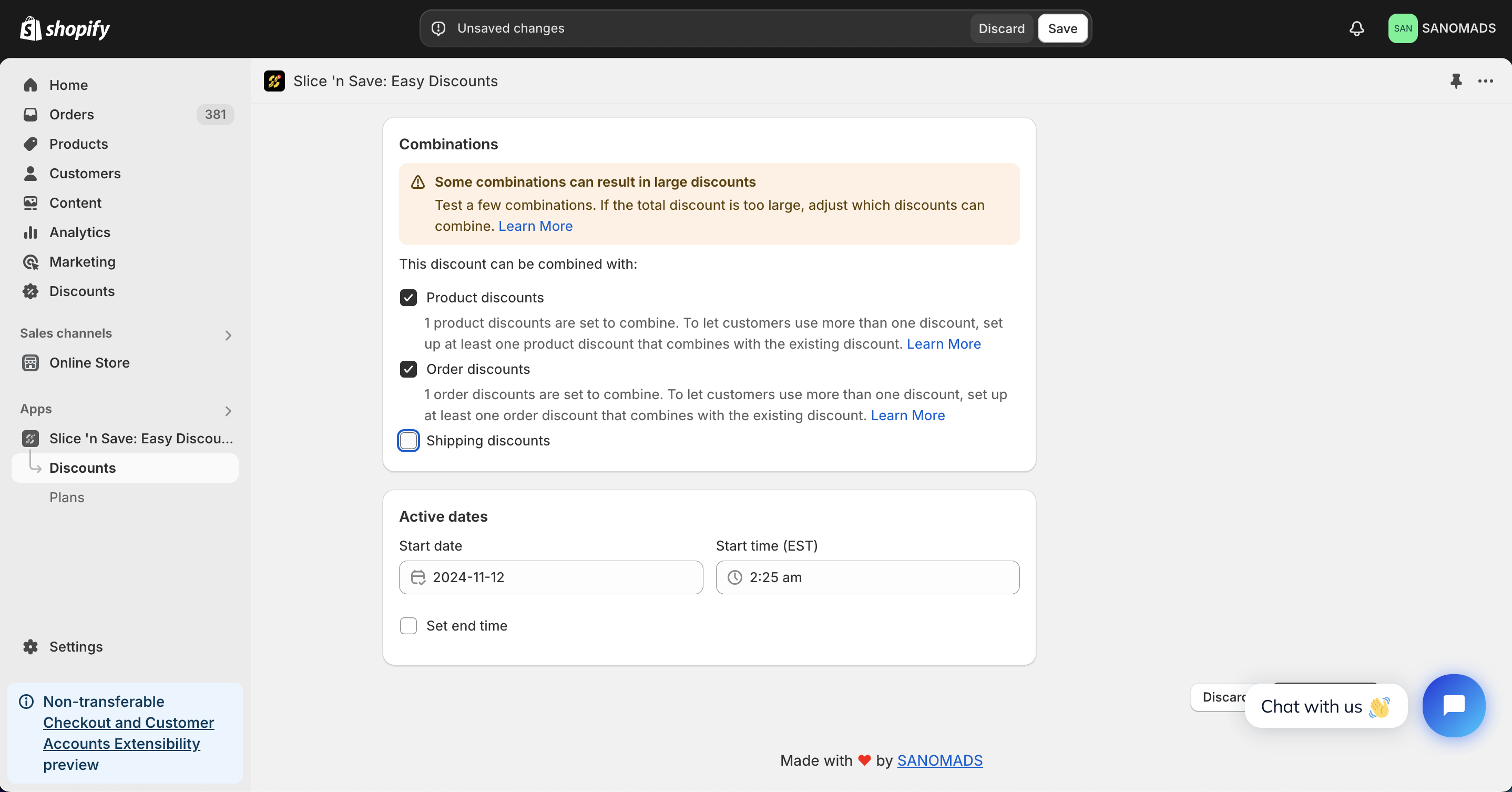
8. Discounts can be applied in <mark style="color:yellow;">**combination**</mark> with other discounts which are created using Slice 'n Save app.

<figure><img src="https://4042363633-files.gitbook.io/~/files/v0/b/gitbook-x-prod.appspot.com/o/spaces%2FyCqyybRMHhSfaSIg5gmh%2Fuploads%2F4zPOlFdJBjYqZs8jASFp%2FScreenshot%202024-11-12%20at%2012.31.52%E2%80%AFPM.png?alt=media&amp;token=2fe6b157-f1d7-4731-944d-9646f6403353" alt=""><figcaption></figcaption></figure>

9. For scheduling a discount, change the <mark style="color:yellow;">**active dates**</mark> to any future date or time.

<figure><img src="https://4042363633-files.gitbook.io/~/files/v0/b/gitbook-x-prod.appspot.com/o/spaces%2FyCqyybRMHhSfaSIg5gmh%2Fuploads%2F4zPOlFdJBjYqZs8jASFp%2FScreenshot%202024-11-12%20at%2012.31.52%E2%80%AFPM.png?alt=media&amp;token=2fe6b157-f1d7-4731-944d-9646f6403353" alt=""><figcaption></figcaption></figure>

10. Adjust the markets from the <mark style="color:yellow;">**manage markets**</mark> section for discount eligibility.

<figure><img src="https://4042363633-files.gitbook.io/~/files/v0/b/gitbook-x-prod.appspot.com/o/spaces%2FyCqyybRMHhSfaSIg5gmh%2Fuploads%2Fa6kBBvxdni3A7UBzF4QX%2FScreenshot%202024-11-12%20at%202.14.00%E2%80%AFPM.png?alt=media&amp;token=bac5abf0-fc99-4d05-99d5-d524d80abd97" alt=""><figcaption></figcaption></figure>

11. Click on <mark style="color:yellow;">**Save**</mark> button to save the discount.

<figure><img src="https://4042363633-files.gitbook.io/~/files/v0/b/gitbook-x-prod.appspot.com/o/spaces%2FyCqyybRMHhSfaSIg5gmh%2Fuploads%2FYuyD6xnXbYL8HlmIOUIr%2FScreenshot%202024-11-12%20at%202.15.24%E2%80%AFPM.png?alt=media&amp;token=fa3d0d67-31d0-415b-9a5e-2603ec85eba8" alt=""><figcaption></figcaption></figure>